Algunas veces quizás tengas que generar automáticamente diferentes contraseñas aleatorias. Esta podría ser una tarea muy simple si existiera una función de Excel tal como “RandomPassword”, así podrías escribir:
=RandomPassword(8)
Y obtener algo así como:
e8NwB9Bi
Bueno, esa es exáctamente la idea del Add-in (complemento) que hice…
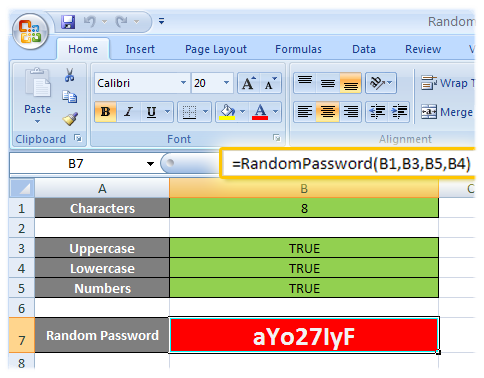
Si no es esto lo que estás buscando, como alternativa, podés visitar el generador online de contraseñas aleatorias.
La sintáxis de la función es:
=RandomPassword(length, [uppercase = TRUE], [numbers = TRUE],
[lowercase = TRUE])
Así de simple… Acá están los links de descarga:
Si no sabés cómo podrías instalar un Add-in (complemento) de Excel, pronto voy a escribir un post al respecto, así que mantenete atento a las actualizaciones del sitio… Por ahora, te puedo dar los siguientes pasos:
1- Copiar la version correspondiente del add-in (XLA o XLAM) a C:\Archivos de Programa\Microsoft Office\OfficeXX\Library (donde XX es la versión de Office, siendo 12 para Office 2007)
2- Seguir las instrucciones dadas acá para Office 2003 or anterior, o ver los pasos de la primera parte de esta página para Office 2007.
 El código está liberado bajo la licencia GNU GPL v3…
En el caso de que quieras ver el código de la función sin tener que mirar dentro del add-in:
Function RandomPassword(Length As Integer, Optional Upper As Boolean = True, Optional Number As Boolean = True, Optional Lower As Boolean = True)
    If Not Upper And Not Lower And Not Number Then
        RandomPassword = "";
        Exit Function
    End If

    Dim Ret As String
    Dim Num As Integer
    Dim Repeat As Boolean

    Randomize

    Chars = 26 * 2 + 10 '26 (a-z) + 26 (A-Z) + 10 (0-9)
        'a-z = 97-122
        'A-Z = 65-90
        '0-9 = 48-57

    For i = 1 To Length
        Repeat = False

        Num = Int(Chars * Rnd) 'Int((upperbound - lowerbound + 1) * Rnd + lowerbound)

        If Num < 26 Then        'a-z
            If Lower Then
                Ret = Ret & Chr(Num + 97)
            Else
                Repeat = True
            End If
        ElseIf Num < 52 Then    'A-Z
            If Upper Then
                Ret = Ret & Chr(Num - 26 + 65)
            Else
                Repeat = True
            End If
        ElseIf Num < 62 Then    '0-9
            If Number Then
                Ret = Ret & Chr(Num - 52 + 48)
            Else
                Repeat = True
            End If
        End If

        If Repeat Then
            i = i - 1
        End If
    Next i

    RandomPassword = Ret
End Function
Support appreciated!
All the content offered in this website is, except noted otherwise, of free nature. This means you can share it wherever you want if you do it freely and stating its source.
If it was useful for you and you’d like to contribute, you can make a donation or, at least, visit one of our advertisers of your choice; they are all around the site.
 Técnicas Arcturianas
 Traducción de la Luz
0 Response to “Generador de contraseñas aleatorias para Excel”