Sometimes you may have to generate automatically different random passwords. This could be a very easy task if you just had an Excel function like “RandomPassword”, so you could write:
=RandomPassword(8)
And get something like:
e8NwB9Bi
Well, this is exactly the idea of the Add-In I’ve made…
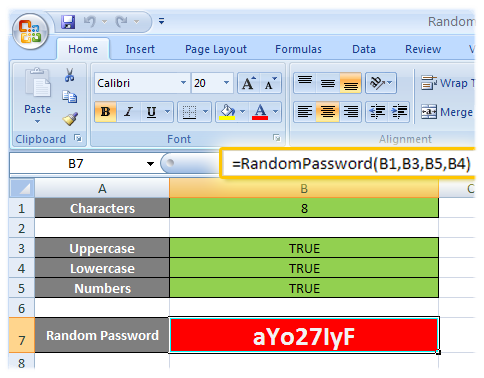
If this isn’t what you’re looking for, as an alternative, you can visit the online random password generator.
The function syntax is as follows:
=RandomPassword(length, [uppercase = TRUE], [numbers = TRUE],
[lowercase = TRUE])
Just as simple as that… Here are the download links:
If you don’t know how you should install an Excel Add-in, keep looking into the site since I’ll write a post about that soon… By now, I can give you this guidelines:
1- Copy the corresponding version of the add-in (XLA or XLAM) to C:\Program Files\Microsoft Office\OfficeXX\Library (where XX is the Office version, being 12 for Office 2007)
2- Follow the instructions given here for Office 2003 or below, or take a look at the first part of this steps for Office 2007.
 The code is licensed under the GNU GPL v3…
Just in case you want to see the function code without looking into the add-in:
Function RandomPassword(Length As Integer, Optional Upper As Boolean = True, Optional Number As Boolean = True, Optional Lower As Boolean = True)
    If Not Upper And Not Lower And Not Number Then
        RandomPassword = "";
        Exit Function
    End If

    Dim Ret As String
    Dim Num As Integer
    Dim Repeat As Boolean

    Randomize

    Chars = 26 * 2 + 10 '26 (a-z) + 26 (A-Z) + 10 (0-9)
        'a-z = 97-122
        'A-Z = 65-90
        '0-9 = 48-57

    For i = 1 To Length
        Repeat = False

        Num = Int(Chars * Rnd) 'Int((upperbound - lowerbound + 1) * Rnd + lowerbound)

        If Num < 26 Then        'a-z
            If Lower Then
                Ret = Ret & Chr(Num + 97)
            Else
                Repeat = True
            End If
        ElseIf Num < 52 Then    'A-Z
            If Upper Then
                Ret = Ret & Chr(Num - 26 + 65)
            Else
                Repeat = True
            End If
        ElseIf Num < 62 Then    '0-9
            If Number Then
                Ret = Ret & Chr(Num - 52 + 48)
            Else
                Repeat = True
            End If
        End If

        If Repeat Then
            i = i - 1
        End If
    Next i

    RandomPassword = Ret
End Function
Support appreciated!
All the content offered in this website is, except noted otherwise, of free nature. This means you can share it wherever you want if you do it freely and stating its source.
If it was useful for you and you’d like to contribute, you can make a donation or, at least, visit one of our advertisers of your choice; they are all around the site.
 Técnicas Arcturianas
 Traducción de la Luz
0 Response to “Excel random password generator”