This is the first post of the “High Voltage Videos” series.
Here, I’ll publish some videos of curiosities and interesting things involving high voltage electricity.
Enjoy them 🙂
Knowledge is inside
This is the first post of the “High Voltage Videos” series.
Here, I’ll publish some videos of curiosities and interesting things involving high voltage electricity.
Enjoy them 🙂
If you have a website with Google Analytics configured and want to be able to track its visits without needing to go to the Analytics Site (except when you need more advanced reports), then this online tool is for you…
Hide WordPress Visual Editor Tab has been updated to the 1.01 version to make it also work when creating new posts and pages. In the previous (1.0) version, it just worked while editing already created posts and pages.
To download the latest version, please visit the original Hide WordPress Visual Editor Tab post.
![wordpress-logo-notext-rgb[1]](http://www.neoegm.com/wp-content/uploads/2009/09/wordpress-logo-notext-rgb1-150x150.png "wordpress-logo-notext-rgb[1]")
Some time ago, Qian Qin, the author of qTranslate, has published what should be modified on the Google (XML) Sitemaps Generator WordPress Plugin to make it support qTranslate.
However, this has never reached any of the releases of this plugin. (Qian Qin says he sent an e-mail to the author and I’ve done it myself, with no response).
So, I’m going to publish what should be modified on the plugin (for the ones who may want to do them themselves) and then, leave the link to download the modified version I prepared. I’ll be updating it for each new release.
Update: I’ve made some code corrections myself to include the different translations of the home page and not to include the entries not written in the default language (just include the written languages). The download and the code snippets have been updated to reflect the changes. If you wish more details, please go to the post of the update.
Update (2009-09-30): I’ve updated the naming of the plugin at the WordPress repository and the support for blogs without qTranslate installed. For releases before the 3.1.6.3, you may get notified for the original version updates (and not for this version supporting qTranslate), so I really recommend updating. If you wish more details, please go to the post of the update.
There are lots of people (like me) who just use the HTML mode of the WordPress Editor… Sometimes, you cannot just disable the WYSIWYG editor (in my case, I cannot do it because I use the qTranslate plugin to enable the creation of posts in different languages)… For this people, having the Visual editor tab, might be a very big problem…
Lets say you’re writing a post in the HTML tab…
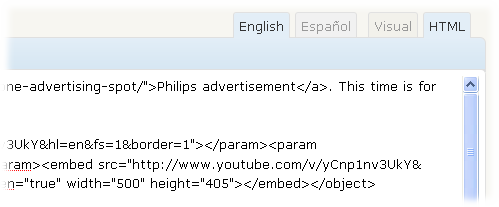
And you click by mistake the Visual tab…
With this online tool, you can easily escape and unescape strings (among other powerful things, explained below)…
If you want to bookmark it, you may prefer this shorter address: http://www.neoegm.com/software/intelligent-escaper-unescaper/. [Press the right mouse button and select the option offered by your browser to add it to your bookmarks/favorites.]
![vista-wow-windows-live-logo_256x256[1]](http://www.neoegm.com/wp-content/uploads/2009/08/vista-wow-windows-live-logo_256x2561-150x150.png "vista-wow-windows-live-logo_256x256[1]")
As you may know, Microsoft has decided some time ago to open its POP3 support for Hotmail, Live and MSN e-mail accounts…
Here, you’ll find the needed information to make them work on your favorite e-mail client…
First, I’ll leave the configuration data (that you can use in any e-mail client) and, then, I’ll explain step by step how to configure the accounts in Outlook…
Server type: POP3
Incoming mail server (POP3): pop3.live.com
Outgoing mail server (SMTP): smtp.live.com
Require logon using Secure Password Authentication (SPA): Yes.
SMTP Authentication: Yes, use the same settings as the incoming mail server.
POP3 Encrypted Connection: Yes.
POP3 Port: 995
SMTP Connection Encryption: Yes, TLS.
SMTP Port: 25.
Read the step by step instructions…
The GCC compiler (or G++) does not always work with our source code files just as we would expect it to. This specially happens when there are special characters in our files (the ones with ASCII codes higher than 127).
Take the following program as a sample (the strings are written in spanish):
#include <iostream>
using std::cout;
using std::cin;
using std::endl;

#include <string>
using std::string;

int main()
{
	string sDummy;

	cout << "Por favor ingrese su contraseña: ";
	cin >> sDummy;

	cout << endl;
	cout << "Su contraseña es inválida, por favor verifíquela e inténtelo nuevamente. Ha ingresado: '" << sDummy << "'." << endl;

	return 0;
}
Let’s compile it…
g++ TestChars.cpp -o TestChars.exe
And execute it… We can easily imagine the output… But… This is what we get:
Por favor ingrese su contrase±a: contraseña

Su contrase±a es invßlida, por favor veriffquela e intTntelo nuevamente. Ha ingresado: 'contraseña'.
Notice that the string that we’ve just typed (“contraseña”) gets correctly printed, while the ones hard-coded in the program don’t.
So… What can we do?
Well, there are some compiler command line parameters ready to help us… They are the finput-charset and fexec-charset command line arguments…
Both take as additional parameter a charset name from the ones supported by the compiler…
For the interested ones, here is the output of the charsets supported by the library that GCC uses to make the conversion… They may not be the same on every system…
# iconv --list
The following list contain all the coded character sets known.  This does not necessarily mean that all combinations of these names can be used for the FROM and TO command line parameters.  One coded character set can be listed with several different names (aliases).

437, 500, 500V1, 850, 851, 852, 855, 856, 857, 860, 861, 862, 863, 864, 865, 866, 866NAV, 869, 874, 904, 1026, 1046, 1047, 8859_1, 8859_2, 8859_3, 8859_4, 8859_5, 8859_6, 8859_7, 8859_8, 8859_9, 10646-1:1993, 10646-1:1993/UCS4, ANSI_X3.4-1968, ANSI_X3.4-1986, ANSI_X3.4, ANSI_X3.110-1983, ANSI_X3.110, ARABIC, ARABIC7, ARMSCII-8, ASCII, ASMO-708, ASMO_449, BALTIC, BIG-5, BIG-FIVE, BIG5-HKSCS, BIG5, BIG5HKSCS, BIGFIVE, BRF, BS_4730, CA, CN-BIG5, CN-GB, CN, CP-AR, CP-GR, CP-HU, CP037, CP038, CP273, CP274, CP275, CP278, CP280, CP281, CP282, CP284, CP285, CP290, CP297, CP367, CP420, CP423, CP424, CP437, CP500, CP737, CP775, CP803, CP813, CP819, CP850, CP851, CP852, CP855, CP856, CP857, CP860, CP861, CP862, CP863, CP864, CP865, CP866, CP866NAV, CP868, CP869, CP870, CP871, CP874, CP875, CP880, CP891, CP901, CP902, CP903, CP904, CP905, CP912, CP915, CP916, CP918, CP920, CP921, CP922, CP930, CP932, CP933, CP935, CP936, CP937, CP939, CP949, CP950, CP1004, CP1008, CP1025, CP1026, CP1046, CP1047, CP1070, CP1079, CP1081, CP1084, CP1089, CP1097, CP1112, CP1122, CP1123, CP1124, CP1125, CP1129, CP1130, CP1132, CP1133, CP1137, CP1140, CP1141, CP1142, CP1143, CP1144, CP1145, CP1146, CP1147, CP1148, CP1149, CP1153, CP1154, CP1155, CP1156, CP1157, CP1158, CP1160, CP1161, CP1162, CP1163, CP1164, CP1166, CP1167, CP1250, CP1251, CP1252, CP1253, CP1254, CP1255, CP1256, CP1257, CP1258, CP1282, CP1361, CP1364, CP1371, CP1388, CP1390, CP1399, CP4517, CP4899, CP4909, CP4971, CP5347, CP9030, CP9066, CP9448, CP10007, CP12712, CP16804, CPIBM861, CSA7-1, CSA7-2, CSASCII, CSA_T500-1983, CSA_T500, CSA_Z243.4-1985-1, CSA_Z243.4-1985-2, CSA_Z243.419851, CSA_Z243.419852, CSDECMCS, CSEBCDICATDE, CSEBCDICATDEA, CSEBCDICCAFR, CSEBCDICDKNO, CSEBCDICDKNOA, CSEBCDICES, CSEBCDICESA, CSEBCDICESS, CSEBCDICFISE, CSEBCDICFISEA, CSEBCDICFR, CSEBCDICIT, CSEBCDICPT, CSEBCDICUK, CSEBCDICUS, CSEUCKR, CSEUCPKDFMTJAPANESE, CSGB2312, CSHPROMAN8, CSIBM037, CSIBM038, CSIBM273, CSIBM274, CSIBM275, CSIBM277, CSIBM278, CSIBM280, CSIBM281, CSIBM284, CSIBM285, CSIBM290, CSIBM297, CSIBM420, CSIBM423, CSIBM424, CSIBM500, CSIBM803, CSIBM851, CSIBM855, CSIBM856, CSIBM857, CSIBM860, CSIBM863, CSIBM864, CSIBM865, CSIBM866, CSIBM868, CSIBM869, CSIBM870, CSIBM871, CSIBM880, CSIBM891, CSIBM901, CSIBM902, CSIBM903, CSIBM904, CSIBM905, CSIBM918, CSIBM921, CSIBM922, CSIBM930, CSIBM932, CSIBM933, CSIBM935, CSIBM937, CSIBM939, CSIBM943, CSIBM1008, CSIBM1025, CSIBM1026, CSIBM1097, CSIBM1112, CSIBM1122, CSIBM1123, CSIBM1124, CSIBM1129, CSIBM1130, CSIBM1132, CSIBM1133, CSIBM1137, CSIBM1140, CSIBM1141, CSIBM1142, CSIBM1143, CSIBM1144, CSIBM1145, CSIBM1146, CSIBM1147, CSIBM1148, CSIBM1149, CSIBM1153, CSIBM1154, CSIBM1155, CSIBM1156, CSIBM1157, CSIBM1158, CSIBM1160, CSIBM1161, CSIBM1163, CSIBM1164, CSIBM1166, CSIBM1167, CSIBM1364, CSIBM1371, CSIBM1388, CSIBM1390, CSIBM1399, CSIBM4517, CSIBM4899, CSIBM4909, CSIBM4971, CSIBM5347, CSIBM9030, CSIBM9066, CSIBM9448, CSIBM12712, CSIBM16804, CSIBM11621162, CSISO4UNITEDKINGDOM, CSISO10SWEDISH, CSISO11SWEDISHFORNAMES, CSISO14JISC6220RO, CSISO15ITALIAN, CSISO16PORTUGESE, CSISO17SPANISH, CSISO18GREEK7OLD, CSISO19LATINGREEK, CSISO21GERMAN, CSISO25FRENCH, CSISO27LATINGREEK1, CSISO49INIS, CSISO50INIS8, CSISO51INISCYRILLIC, CSISO58GB1988, CSISO60DANISHNORWEGIAN, CSISO60NORWEGIAN1, CSISO61NORWEGIAN2, CSISO69FRENCH, CSISO84PORTUGUESE2, CSISO85SPANISH2, CSISO86HUNGARIAN, CSISO88GREEK7, CSISO89ASMO449, CSISO90, CSISO92JISC62991984B, CSISO99NAPLPS, CSISO103T618BIT, CSISO111ECMACYRILLIC, CSISO121CANADIAN1, CSISO122CANADIAN2, CSISO139CSN369103, CSISO141JUSIB1002, CSISO143IECP271, CSISO150, CSISO150GREEKCCITT, CSISO151CUBA, CSISO153GOST1976874, CSISO646DANISH, CSISO2022CN, CSISO2022JP, CSISO2022JP2, CSISO2022KR, CSISO2033, CSISO5427CYRILLIC, CSISO5427CYRILLIC1981, CSISO5428GREEK, CSISO10367BOX, CSISOLATIN1, CSISOLATIN2, CSISOLATIN3, CSISOLATIN4, CSISOLATIN5, CSISOLATIN6, CSISOLATINARABIC, CSISOLATINCYRILLIC, CSISOLATINGREEK, CSISOLATINHEBREW, CSKOI8R, CSKSC5636, CSMACINTOSH, CSNATSDANO, CSNATSSEFI, CSN_369103, CSPC8CODEPAGE437, CSPC775BALTIC, CSPC850MULTILINGUAL, CSPC862LATINHEBREW, CSPCP852, CSSHIFTJIS, CSUCS4, CSUNICODE, CSWINDOWS31J, CUBA, CWI-2, CWI, CYRILLIC, DE, DEC-MCS, DEC, DECMCS, DIN_66003, DK, DS2089, DS_2089, E13B, EBCDIC-AT-DE-A, EBCDIC-AT-DE, EBCDIC-BE, EBCDIC-BR, EBCDIC-CA-FR, EBCDIC-CP-AR1, EBCDIC-CP-AR2, EBCDIC-CP-BE, EBCDIC-CP-CA, EBCDIC-CP-CH, EBCDIC-CP-DK, EBCDIC-CP-ES, EBCDIC-CP-FI, EBCDIC-CP-FR, EBCDIC-CP-GB, EBCDIC-CP-GR, EBCDIC-CP-HE, EBCDIC-CP-IS, EBCDIC-CP-IT, EBCDIC-CP-NL, EBCDIC-CP-NO, EBCDIC-CP-ROECE, EBCDIC-CP-SE, EBCDIC-CP-TR, EBCDIC-CP-US, EBCDIC-CP-WT, EBCDIC-CP-YU, EBCDIC-CYRILLIC, EBCDIC-DK-NO-A, EBCDIC-DK-NO, EBCDIC-ES-A, EBCDIC-ES-S, EBCDIC-ES, EBCDIC-FI-SE-A, EBCDIC-FI-SE, EBCDIC-FR, EBCDIC-GREEK, EBCDIC-INT, EBCDIC-INT1, EBCDIC-IS-FRISS, EBCDIC-IT, EBCDIC-JP-E, EBCDIC-JP-KANA, EBCDIC-PT, EBCDIC-UK, EBCDIC-US, EBCDICATDE, EBCDICATDEA, EBCDICCAFR, EBCDICDKNO, EBCDICDKNOA, EBCDICES, EBCDICESA, EBCDICESS, EBCDICFISE, EBCDICFISEA, EBCDICFR, EBCDICISFRISS, EBCDICIT, EBCDICPT, EBCDICUK, EBCDICUS, ECMA-114, ECMA-118, ECMA-128, ECMA-CYRILLIC, ECMACYRILLIC, ELOT_928, ES, ES2, EUC-CN, EUC-JISX0213, EUC-JP-MS, EUC-JP, EUC-KR, EUC-TW, EUCCN, EUCJP-MS, EUCJP-OPEN, EUCJP-WIN, EUCJP, EUCKR, EUCTW, FI, FR, GB, GB2312, GB13000, GB18030, GBK, GB_1988-80, GB_198880, GEORGIAN-ACADEMY, GEORGIAN-PS, GOST_19768-74, GOST_19768, GOST_1976874, GREEK-CCITT, GREEK, GREEK7-OLD, GREEK7, GREEK7OLD, GREEK8, GREEKCCITT, HEBREW, HP-GREEK8, HP-ROMAN8, HP-ROMAN9, HP-THAI8, HP-TURKISH8, HPGREEK8, HPROMAN8, HPROMAN9, HPTHAI8, HPTURKISH8, HU, IBM-803, IBM-856, IBM-901, IBM-902, IBM-921, IBM-922, IBM-930, IBM-932, IBM-933, IBM-935, IBM-937, IBM-939, IBM-943, IBM-1008, IBM-1025, IBM-1046, IBM-1047, IBM-1097, IBM-1112, IBM-1122, IBM-1123, IBM-1124, IBM-1129, IBM-1130, IBM-1132, IBM-1133, IBM-1137, IBM-1140, IBM-1141, IBM-1142, IBM-1143, IBM-1144, IBM-1145, IBM-1146, IBM-1147, IBM-1148, IBM-1149, IBM-1153, IBM-1154, IBM-1155, IBM-1156, IBM-1157, IBM-1158, IBM-1160, IBM-1161, IBM-1162, IBM-1163, IBM-1164, IBM-1166, IBM-1167, IBM-1364, IBM-1371, IBM-1388, IBM-1390, IBM-1399, IBM-4517, IBM-4899, IBM-4909, IBM-4971, IBM-5347, IBM-9030, IBM-9066, IBM-9448, IBM-12712, IBM-16804, IBM037, IBM038, IBM256, IBM273, IBM274, IBM275, IBM277, IBM278, IBM280, IBM281, IBM284, IBM285, IBM290, IBM297, IBM367, IBM420, IBM423, IBM424, IBM437, IBM500, IBM775, IBM803, IBM813, IBM819, IBM848, IBM850, IBM851, IBM852, IBM855, IBM856, IBM857, IBM860, IBM861, IBM862, IBM863, IBM864, IBM865, IBM866, IBM866NAV, IBM868, IBM869, IBM870, IBM871, IBM874, IBM875, IBM880, IBM891, IBM901, IBM902, IBM903, IBM904, IBM905, IBM912, IBM915, IBM916, IBM918, IBM920, IBM921, IBM922, IBM930, IBM932, IBM933, IBM935, IBM937, IBM939, IBM943, IBM1004, IBM1008, IBM1025, IBM1026, IBM1046, IBM1047, IBM1089, IBM1097, IBM1112, IBM1122, IBM1123, IBM1124, IBM1129, IBM1130, IBM1132, IBM1133, IBM1137, IBM1140, IBM1141, IBM1142, IBM1143, IBM1144, IBM1145, IBM1146, IBM1147, IBM1148, IBM1149, IBM1153, IBM1154, IBM1155, IBM1156, IBM1157, IBM1158, IBM1160, IBM1161, IBM1162, IBM1163, IBM1164, IBM1166, IBM1167, IBM1364, IBM1371, IBM1388, IBM1390, IBM1399, IBM4517, IBM4899, IBM4909, IBM4971, IBM5347, IBM9030, IBM9066, IBM9448, IBM12712, IBM16804, IEC_P27-1, IEC_P271, INIS-8, INIS-CYRILLIC, INIS, INIS8, INISCYRILLIC, ISIRI-3342, ISIRI3342, ISO-2022-CN-EXT, ISO-2022-CN, ISO-2022-JP-2, ISO-2022-JP-3, ISO-2022-JP, ISO-2022-KR, ISO-8859-1, ISO-8859-2, ISO-8859-3, ISO-8859-4, ISO-8859-5, ISO-8859-6, ISO-8859-7, ISO-8859-8, ISO-8859-9, ISO-8859-9E, ISO-8859-10, ISO-8859-11, ISO-8859-13, ISO-8859-14, ISO-8859-15, ISO-8859-16, ISO-10646, ISO-10646/UCS2, ISO-10646/UCS4, ISO-10646/UTF-8, ISO-10646/UTF8, ISO-CELTIC, ISO-IR-4, ISO-IR-6, ISO-IR-8-1, ISO-IR-9-1, ISO-IR-10, ISO-IR-11, ISO-IR-14, ISO-IR-15, ISO-IR-16, ISO-IR-17, ISO-IR-18, ISO-IR-19, ISO-IR-21, ISO-IR-25, ISO-IR-27, ISO-IR-37, ISO-IR-49, ISO-IR-50, ISO-IR-51, ISO-IR-54, ISO-IR-55, ISO-IR-57, ISO-IR-60, ISO-IR-61, ISO-IR-69, ISO-IR-84, ISO-IR-85, ISO-IR-86, ISO-IR-88, ISO-IR-89, ISO-IR-90, ISO-IR-92, ISO-IR-98, ISO-IR-99, ISO-IR-100, ISO-IR-101, ISO-IR-103, ISO-IR-109, ISO-IR-110, ISO-IR-111, ISO-IR-121, ISO-IR-122, ISO-IR-126, ISO-IR-127, ISO-IR-138, ISO-IR-139, ISO-IR-141, ISO-IR-143, ISO-IR-144, ISO-IR-148, ISO-IR-150, ISO-IR-151, ISO-IR-153, ISO-IR-155, ISO-IR-156, ISO-IR-157, ISO-IR-166, ISO-IR-179, ISO-IR-193, ISO-IR-197, ISO-IR-199, ISO-IR-203, ISO-IR-209, ISO-IR-226, ISO/TR_11548-1, ISO646-CA, ISO646-CA2, ISO646-CN, ISO646-CU, ISO646-DE, ISO646-DK, ISO646-ES, ISO646-ES2, ISO646-FI, ISO646-FR, ISO646-FR1, ISO646-GB, ISO646-HU, ISO646-IT, ISO646-JP-OCR-B, ISO646-JP, ISO646-KR, ISO646-NO, ISO646-NO2, ISO646-PT, ISO646-PT2, ISO646-SE, ISO646-SE2, ISO646-US, ISO646-YU, ISO2022CN, ISO2022CNEXT, ISO2022JP, ISO2022JP2, ISO2022KR, ISO6937, ISO8859-1, ISO8859-2, ISO8859-3, ISO8859-4, ISO8859-5, ISO8859-6, ISO8859-7, ISO8859-8, ISO8859-9, ISO8859-9E, ISO8859-10, ISO8859-11, ISO8859-13, ISO8859-14, ISO8859-15, ISO8859-16, ISO11548-1, ISO88591, ISO88592, ISO88593, ISO88594, ISO88595, ISO88596, ISO88597, ISO88598, ISO88599, ISO88599E, ISO885910, ISO885911, ISO885913, ISO885914, ISO885915, ISO885916, ISO_646.IRV:1991, ISO_2033-1983, ISO_2033, ISO_5427-EXT, ISO_5427, ISO_5427:1981, ISO_5427EXT, ISO_5428, ISO_5428:1980, ISO_6937-2, ISO_6937-2:1983, ISO_6937, ISO_6937:1992, ISO_8859-1, ISO_8859-1:1987, ISO_8859-2, ISO_8859-2:1987, ISO_8859-3, ISO_8859-3:1988, ISO_8859-4, ISO_8859-4:1988, ISO_8859-5, ISO_8859-5:1988, ISO_8859-6, ISO_8859-6:1987, ISO_8859-7, ISO_8859-7:1987, ISO_8859-7:2003, ISO_8859-8, ISO_8859-8:1988, ISO_8859-9, ISO_8859-9:1989, ISO_8859-9E, ISO_8859-10, ISO_8859-10:1992, ISO_8859-14, ISO_8859-14:1998, ISO_8859-15, ISO_8859-15:1998, ISO_8859-16, ISO_8859-16:2001, ISO_9036, ISO_10367-BOX, ISO_10367BOX, ISO_11548-1, ISO_69372, IT, JIS_C6220-1969-RO, JIS_C6229-1984-B, JIS_C62201969RO, JIS_C62291984B, JOHAB, JP-OCR-B, JP, JS, JUS_I.B1.002, KOI-7, KOI-8, KOI8-R, KOI8-RU, KOI8-T, KOI8-U, KOI8, KOI8R, KOI8U, KSC5636, L1, L2, L3, L4, L5, L6, L7, L8, L10, LATIN-9, LATIN-GREEK-1, LATIN-GREEK, LATIN1, LATIN2, LATIN3, LATIN4, LATIN5, LATIN6, LATIN7, LATIN8, LATIN10, LATINGREEK, LATINGREEK1, MAC-CENTRALEUROPE, MAC-CYRILLIC, MAC-IS, MAC-SAMI, MAC-UK, MAC, MACCYRILLIC, MACINTOSH, MACIS, MACUK, MACUKRAINIAN, MIK, MS-ANSI, MS-ARAB, MS-CYRL, MS-EE, MS-GREEK, MS-HEBR, MS-MAC-CYRILLIC, MS-TURK, MS932, MS936, MSCP949, MSCP1361, MSMACCYRILLIC, MSZ_7795.3, MS_KANJI, NAPLPS, NATS-DANO, NATS-SEFI, NATSDANO, NATSSEFI, NC_NC0010, NC_NC00-10, NC_NC00-10:81, NF_Z_62-010, NF_Z_62-010_(1973), NF_Z_62-010_1973, NF_Z_62010, NF_Z_62010_1973, NO, NO2, NS_4551-1, NS_4551-2, NS_45511, NS_45512, OS2LATIN1, OSF00010001, OSF00010002, OSF00010003, OSF00010004, OSF00010005, OSF00010006, OSF00010007, OSF00010008, OSF00010009, OSF0001000A, OSF00010020, OSF00010100, OSF00010101, OSF00010102, OSF00010104, OSF00010105, OSF00010106, OSF00030010, OSF0004000A, OSF0005000A, OSF05010001, OSF100201A4, OSF100201A8, OSF100201B5, OSF100201F4, OSF100203B5, OSF1002011C, OSF1002011D, OSF1002035D, OSF1002035E, OSF1002035F, OSF1002036B, OSF1002037B, OSF10010001, OSF10010004, OSF10010006, OSF10020025, OSF10020111, OSF10020115, OSF10020116, OSF10020118, OSF10020122, OSF10020129, OSF10020352, OSF10020354, OSF10020357, OSF10020359, OSF10020360, OSF10020364, OSF10020365, OSF10020366, OSF10020367, OSF10020370, OSF10020387, OSF10020388, OSF10020396, OSF10020402, OSF10020417, PT, PT2, PT154, R8, R9, RK1048, ROMAN8, ROMAN9, RUSCII, SE, SE2, SEN_850200_B, SEN_850200_C, SHIFT-JIS, SHIFT_JIS, SHIFT_JISX0213, SJIS-OPEN, SJIS-WIN, SJIS, SS636127, STRK1048-2002, ST_SEV_358-88, T.61-8BIT, T.61, T.618BIT, TCVN-5712, TCVN, TCVN5712-1, TCVN5712-1:1993, THAI8, TIS-620, TIS620-0, TIS620.2529-1, TIS620.2533-0, TIS620, TS-5881, TSCII, TURKISH8, UCS-2, UCS-2BE, UCS-2LE, UCS-4, UCS-4BE, UCS-4LE, UCS2, UCS4, UHC, UJIS, UK, UNICODE, UNICODEBIG, UNICODELITTLE, US-ASCII, US, UTF-7, UTF-8, UTF-16, UTF-16BE, UTF-16LE, UTF-32, UTF-32BE, UTF-32LE, UTF7, UTF8, UTF16, UTF16BE, UTF16LE, UTF32, UTF32BE, UTF32LE, VISCII, WCHAR_T, WIN-SAMI-2, WINBALTRIM, WINDOWS-31J, WINDOWS-874, WINDOWS-936, WINDOWS-1250, WINDOWS-1251, WINDOWS-1252, WINDOWS-1253, WINDOWS-1254, WINDOWS-1255, WINDOWS-1256, WINDOWS-1257, WINDOWS-1258, WINSAMI2, WS2, YU
The first parameter, finput-charset, is the charset used to read the source code files… The second one, fexec-charset, is the used to store the strings and character constants in the executable file, so they will be shown correctly while running…
So, assuming you’re writing your source files in iso-8859-1 (the most common charset on Windows platforms) and want to show them while running in cp437 (the DOS console charset), we could call the compiler like this:
g++ TestChars.cpp -o TestChars.exe -finput-charset=iso-8859-1 -fexec-charset=cp437
And what do we expect to get? 🙂
Por favor ingrese su contraseña: contraseña

Su contraseña es inválida, por favor verifíquela e inténtelo nuevamente. Ha ingresado: 'contraseña'.
Everything worked just the way we expected! 🙂
Now, finally, I’ll show how to configure these command line options for the wxDev IDE…
First of all, I must say there are two ways to set compiler options: global options and project options… As you may imagine, the first ones are applied to every compiled project, while the latter just get applied to the currently opened project (they are set in a per project basis)…
To set the parameters in the global compiler options you must got to the Tools menu and then open the Compiler Options item…
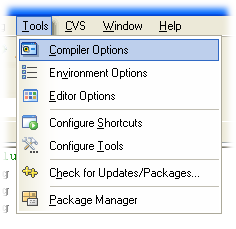
After that, you simply enter the following string (the parameters) into the “Add the following commands when calling compiler” box:
-finput-charset=iso-8859-1 -fexec-charset=cp437
If there are already other parameters configured, you should append them…
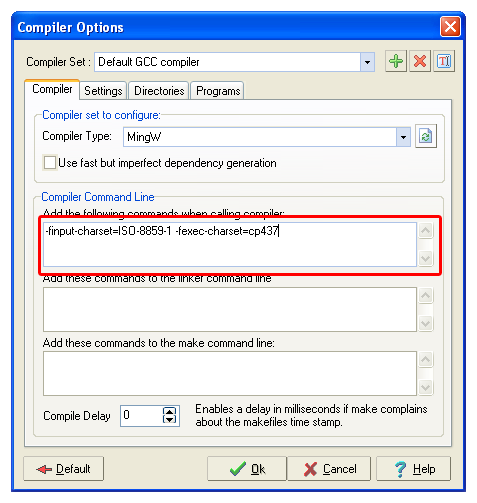
They will be sent to both the C compiler and the C++ compiler…
The other alternative is to set the same parameters in the project options…
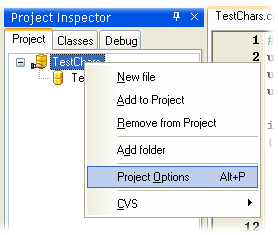
First, we open the project options… Either going to Project->Project Options or right clicking the project and going to “Project Options”…
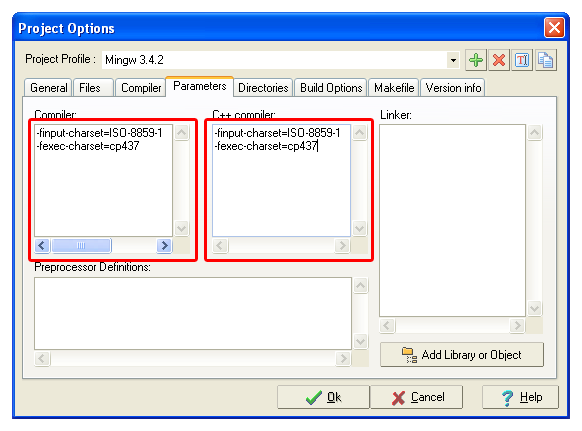
Then, we go to the Parameters page and paste the parameters string in the two compiler boxes… Both parameters can be entered either in a single line or broken apart… Just as before, if there are already other parameters configured, you should append them…
Whell, that’s all… Most IDEs will have similar options!
 Técnicas Arcturianas
 Traducción de la Luz
Recent Comments